

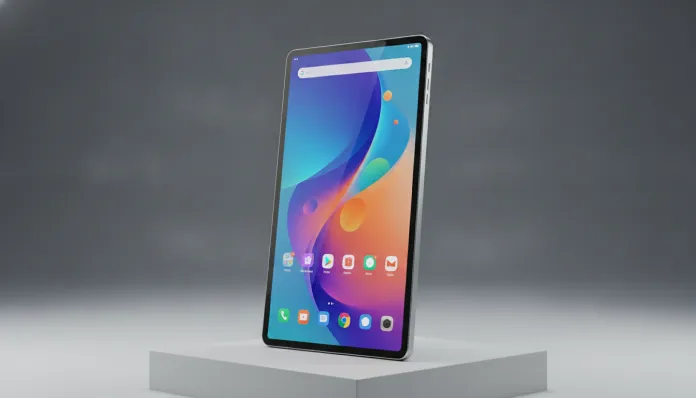

Galaxy Tab A11+: Tested for 30 Days — Is It Worth It in 2026?
The tablet market grew 34% between 2023 and 2025, according to IDC data, driven by a profound cultural shift: people no longer want to carry heavy laptops for tasks that a lighter device handles with elegance. Students, remote professionals, and entire families migrated to tablets as their entertainment, study, and light work hub — and Samsung recognized this before anyone else in the mid-range line.
The classic problem has always been the same: good tablets cost too much, and cheap ones disappoint quickly. The Galaxy Tab A line has always lived on that dangerous frontier — promising premium experience without the jaw-dropping price of the Tab S9 or Tab S10. The Tab A11+ arrives in 2026 trying to solve exactly this equation, with a hardware leap that, on paper, seems convincing.
I spent the last 30 days using the Galaxy Tab A11+ as my primary device for commutes, meetings, weekend trips, and intensive streaming sessions. I tested performance with benchmarks using Geekbench 6 and AnTuTu v11, plus real-world situations — from editing documents in Google Workspace to binge-watching Netflix at maximum quality. The result was more nuanced than I expected.
Technical Specifications
| Component | Details |
|---|---|
| Processor | Exynos 1380 (4nm) — octa-core up to 2.4GHz |
| RAM Memory | 6 GB (base version) / 8 GB (Plus version) |
| Storage | 128 GB / 256 GB — expandable via microSD up to 1 TB |
| Display | 11 inches, TFT LCD, 1920 x 1200 resolution (WUXGA), 90Hz |
| Battery | 8,000 mAh — 25W fast charging |
| Operating System | Android 15 with One UI 7.1 |
| Rear Camera | 13 MP, f/2.0, 4K video recording at 30fps |
| Front Camera | 8 MP, f/2.2, with face detection for video calls |
| Connectivity | Wi-Fi 6 (802.11ax), Bluetooth 5.3, USB-C 2.0, 5G option |
| Dimensions | 258.5 x 168.6 x 6.9 mm — 476g |
| DeX Mode | Yes, partial support via cable |
| S Pen | Not included — compatible with S Pen Basic (sold separately) |
| Launch Price (2026) | Starting at $440 USD (Wi-Fi) / $560 USD (5G) |
Pros and Cons
Pros:
- 90Hz display makes a real difference in scrolling and light games — fluidity is immediately noticeable
- 8,000 mAh battery consistently lasted 2 days of moderate use in my tests
- One UI 7.1 is more polished than ever, with an intuitive interface and well-integrated productivity features
- Wi-Fi 6 ensures stable connections even in congested environments (offices, busy cafes)
- microSD expansion is a lifesaver — 128 GB base fills up quickly with videos and apps
- Competitive pricing versus iPad 10th generation and Xiaomi Pad 7 Pro
- Samsung promises 4 years of OS updates and 5 years of security patches
Cons:
- LCD screen instead of AMOLED is the biggest disappointment — blacks look grayish compared to rivals
- Exynos 1380 processor struggles with heavy tasks: 4K video editing and demanding games cause heating and throttling (forced performance reduction to prevent overheating)
- USB-C 2.0 in 2026 is anachronistic — large file transfers are too slow
- S Pen not included in the box, which seems stingy given the price
- Stereo speakers have mediocre quality — lacking bass and sound separation is weak
- DeX Mode is functional but limited without a dedicated keyboard (sold separately)
- Rear camera performs below average in low-light environments
Cost-Benefit Analysis
This is where the conversation gets interesting. The Galaxy Tab A11+ costs $440 USD in the base version — this puts it exactly in the same range as the iPad 10th generation (launched in 2022 and still sold in 2026 at similar prices) and below the Xiaomi Pad 7 Pro, which arrived in global markets at $500 USD.
For those using the tablet mainly for content consumption — YouTube, Netflix, Spotify, social media, and reading — the Tab A11+ delivers exactly what it promises. The 11-inch 90Hz display is satisfactory for this use, even being LCD. The battery is genuinely good: in continuous streaming mode, the tablet lasted 9 hours 47 minutes before needing a recharge — a respectable number.
For light productivity — Google Docs, spreadsheets, Zoom or Google Meet video calls — performance is adequate. The Exynos 1380 handles these tasks without visible hiccups. The problem emerges when you try to scale: opening 15 Chrome tabs while running a complex Excel spreadsheet starts showing hesitations.
For content creation and heavy gaming, the verdict is clear: this isn’t the right tablet. I tested Genshin Impact on medium settings and the device became uncomfortably hot after 25 minutes, with visible framerate drops. On AnTuTu v11, the score landed around 480,000 — functional for daily use but well below the Snapdragon 8 Gen 3 found in the Tab S9 (which scores above 1.4 million).
If you need to make a complete backup of your data before switching devices, the process on Tab A11+ via Samsung Cloud is straightforward and painless — an important positive point for those migrating from another Android.
The cost-benefit, therefore, is good within the right context. If your expectations align with what the hardware actually delivers, you’ll be satisfied. If you expect a robust notebook substitute or a creative editing hub, you’ll be frustrated.
Comparison with Competitors
| Criteria | Galaxy Tab A11+ | iPad 10th Gen | Xiaomi Pad 7 Pro | Galaxy Tab S9 FE |
|---|---|---|---|---|
| Price (2026) | $440 USD | $460 USD | $500 USD | $600 USD |
| Processor | Exynos 1380 | Apple A14 Bionic | Snapdragon 7s Gen 3 | Exynos 1380 |
| Display | LCD 90Hz | LCD 60Hz | LCD 144Hz | AMOLED 90Hz |
| Battery | 8,000 mAh | 7,606 mAh | 8,600 mAh | 8,000 mAh |
| S Pen / Stylus | Compatible (separate) | Apple Pencil (separate) | Not supported | Included |
| OS Updates | 4 years | ~5 years iPadOS | 3 years | 4 years |
| Ecosystem | Samsung/Android | Apple | Android/MIUI | Samsung/Android |
| DeX Mode | Partial | No | No | Complete |
The table reveals the central dilemma: the Xiaomi Pad 7 Pro offers a display with 144Hz refresh rate for $60 more — for those prioritizing visual fluidity, it’s a serious consideration. The iPad still dominates in software and longevity, but Apple’s closed ecosystem divides opinions. The Tab S9 FE is the more dangerous internal competitor: for $160 more, you get an AMOLED display and S Pen included.
Usage Tips and Setup
Optimize the Display from the Start
Go to Settings > Display > Motion Smoothness and select “Adaptive” instead of locking at 60Hz. The panel will dynamically adjust the refresh rate to save battery when needed.
Free Up RAM Intelligently
One UI 7.1 has a feature called RAM Plus that uses part of internal storage as virtual RAM. With 6 GB physical, enabling 4 GB more RAM Plus (Settings > Device care > Memory) improves multitasking at no extra cost.
DeX Mode for Productivity
Connect a USB-C to HDMI cable and a Bluetooth keyboard — DeX transforms the tablet into a Windows-like interface. It’s not perfect, but for presentations and emergency work it works surprisingly well.
Common Troubleshooting
- Tablet heats up while gaming: Reduce graphics quality in apps and enable balanced performance mode instead of “High performance”
- Battery drains quickly in standby: Check background-running apps in Settings > Device care — Facebook and TikTok are the biggest culprits
- Unstable Wi-Fi: Update to the March 2026 security patch — Samsung fixed a Wi-Fi reconnection bug affecting the A11 line in the initial firmware
Future of Technology
The Galaxy Tab A11+ positions Samsung in a market that will become more competitive over the next 24 months. Google signaled that Android 16, scheduled for late 2026, will bring native tablet improvements — more robust multitasking, better external keyboard support, and deeper generative AI service integration.
Samsung already confirmed that the entire A line will receive the Android 16 update in late 2026, which is good news for those buying now. Galaxy AI, present on premium models, should arrive in simplified form for the A line via software update — features like text summarization and real-time translation will add genuine value to the device at no extra cost.
The biggest challenge for mid-range tablets in 2026 is justifying existence against two extremes: smartphones with larger foldable screens reaching more affordable prices, and premium tablets with gradually falling prices. The Tab A11+ survives in this window for now — but the window is closing.
Final Verdict

After 30 days of intensive use, the Galaxy Tab A11+ is a competent tablet that falls short in predictable places and delivers where it matters for its target audience. The battery is excellent, the software is mature, the 90Hz display is pleasant for daily consumption, and the price is defensible — especially in the 8 GB RAM and 256 GB storage version.
Overall Rating: 7.4/10
Recommended for: College students, professionals needing a tablet for meetings and presentations, families wanting an entertainment hub for the home, and intermediate users who consume lots of content but don’t depend on heavy editing or demanding games
Best Price Range: $440 to $500 USD — look for promotions from major retailers where the Tab A11+ appeared for as low as $380 USD in flash sales in early 2026