

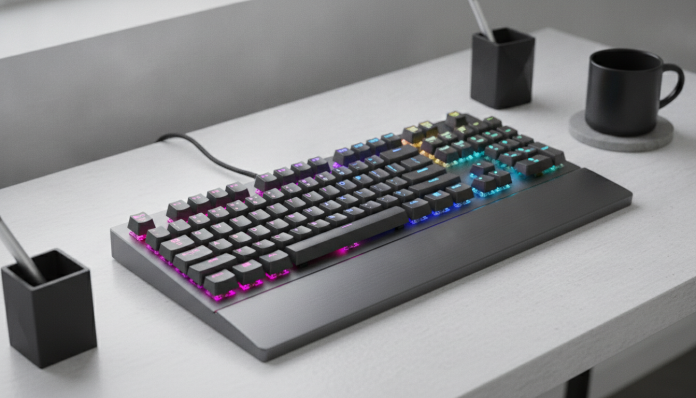

Mechanical Keyboard Under 300 Reais Worth Buying
If you’re tired of membrane keyboards — those using a rubber layer to register keystrokes without clear tactile feedback — and want to jump into the mechanical world without breaking the bank, the good news is that in 2026 there are real options below 300 reais. The less good news is that this price range requires extra attention: it mixes honest products with items using “mechanical” as pure marketing while delivering generic switches with short lifespans.
The short answer: yes, you can buy a decent mechanical keyboard for up to 300 reais in Brazil, but you need to know what to give up and what to demand. In this range, most models come with proprietary switches from lesser-known brands, without hot-swap (the ability to swap switches without soldering), and plastic construction. None of this is a dealbreaker if you understand what you’re buying.
This guide focuses on models available in Brazil — both in national stores and via import with invoice — and explains the criteria that really matter in your decision. For those using keyboards mainly for work and browsing, the options are good. For those wanting to build an audio setup or seeking refined “thock” sound and deep switch customization, the 300-real range will disappoint.
What to Expect from a Mechanical Keyboard in This Price Range
Before looking at models, it’s important to calibrate expectations. Quality mechanical keyboards start, in the global market, around 40 to 60 dollars in the US — which, with taxes and shipping, easily reaches 250-350 reais in Brazil depending on the sales channel.
The most common switches in this range are Outemu switches and generic variants following the Cherry MX standard connector (the industry’s most popular standard, with cross pin). They work, have a declared lifespan generally between 50 and 60 million actuations according to manufacturer datasheets, and deliver the mechanical feel you want. They’re not the world’s best switches, but they do the job.
Construction is typically all ABS plastic, which is lighter and resonates more than PBT (a denser plastic used in pricier products). ABS keycaps tend to gain an oily appearance over time. Again: not a serious problem, but it’s real.
Models Worth Your Attention Up to 300 Reais
Redragon K552 (Kumara)
The Redragon K552, known as Kumara, is probably the best-selling mechanical keyboard in Brazil at this price point. According to Redragon’s datasheet, it’s a TKL layout (tenkeyless, meaning no side numeric block — reducing desk footprint and keeping the mouse closer), with Outemu switches available in Blue (tactile and clicky), Red (linear and silent), and Brown (tactile without audible click) versions.
Lighting is RGB by zone, not per key individually, meaning you can’t light each key in a different color. The cable is fixed USB-A (not removable), and the keyboard has no hot-swap. Price ranges around 180 to 250 reais depending on the store and timing, according to listings on Brazilian marketplaces.
Havit KB487L
Havit is another brand present in Brazil with support via local distributors. The KB487L model is a compact 87-key layout (equivalent to TKL), with mechanical standard switches, RGB lighting, and ABS keycaps. Havit claims their switches have a 50-million actuation lifespan. Always check the seller’s datasheet for which specific switch accompanies the Brazil-sold version, as sometimes the imported model comes with different switches than advertised.
Motospeed CK61 and CK62
Motospeed offers 60% layouts — which also remove function keys F1-F12 and the navigation block, leaving only the alphanumeric block. This greatly reduces occupied space but requires you to learn key combinations (Fn + key) to access functions. For those who type heavily and don’t use function shortcuts often, 60% is excellent for the desk. The CK61 and CK62 models generally run 150 to 220 reais. Motospeed lists Outemu switches in the usual color options.
HyperX Alloy Origins Core (Watch the Price)
The HyperX Alloy Origins Core sometimes appears below 300 reais in Brazil promotions. This is a different case: aluminum construction (rare in this range), proprietary HyperX Red switches with 80 million actuations according to the maker, and HyperX NGENUITY software for per-key RGB customization. When appearing in promos at this price, it’s probably the best possible purchase. Outside promotions, it usually costs more.
Comparative Specification Sheet of Main Models
| Model | Layout | Available Switches | Lighting | Construction | Price Range (BR) |
|---|---|---|---|---|---|
| Redragon K552 | TKL (87 keys) | Outemu Blue/Red/Brown | RGB by zone | ABS Plastic | R$ 180–250 |
| Havit KB487L | TKL (87 keys) | Generic mechanical | RGB per key | ABS Plastic | R$ 200–270 |
| Motospeed CK61/62 | 60% (61 keys) | Outemu Blue/Red | RGB per key | ABS Plastic | R$ 150–220 |
| HyperX Alloy Origins Core | TKL (87 keys) | HyperX Red | RGB per key | Aluminum | R$ 250–350* |
*The HyperX Origins Core varies widely in price; confirm the current value before buying.
The Criteria That Decide the Purchase
Which Switch to Choose: Blue, Red, or Brown
This is the point that confuses newcomers most. Think of switches as the “engine” of each key. Blue clicks — makes an audible sound and offers tactile feedback, great for those wanting to feel and hear each actuation, but can bother those around you. Red is linear: presses down smoothly without obstacles, silent, preferred by gamers or fast typers without needing a click. Brown splits the difference: has a slight tactile bump in the middle of the stroke without making a click sound.
For typing in shared office: Red or Brown. For home use without noise concerns: any. For someone switching from notebook keyboard: Red.
Layout: TKL or 60%?
If you use the numeric keypad frequently (spreadsheets, financial data), TKL might already be too small. If you rarely use the numpad, TKL frees valuable desk space — especially useful in setups with 27″ 1440p 165Hz gaming monitors where desk space needs to accommodate one more peripheral. 60% is for those already comfortable with compact layouts or with truly small desks.
Software and Compatibility
Models from brands like Redragon and HyperX have their own software available for Windows. On macOS, most work as standard HID keyboards (plug-and-play), but without RGB customization support via software. Check the manufacturer’s website for macOS software version compatibility before purchasing.
Importing and Warranty in Brazil
Much of these keyboards are sold by importers on Mercado Livre, Shopee, and Amazon Brasil, with Brazilian invoices and 90-day to 1-year warranty depending on the seller. Keyboards don’t need Anatel approval to be sold in the country (Anatel regulates radiocommunication equipment), but verify if the product has an invoice issued in Brazil — this guarantees your consumer rights under the Consumer Protection Code.
If you plan to import directly from sites like AliExpress or Amazon US to save money, know that the exemption value for individuals is 50 dollars (above that, there’s taxation). For a keyboard above that threshold, the price difference may not offset the risk of paying tax at the border.
Pros and Cons
Pros:
- Real mechanical feel at accessible price
- Declared durability far superior to membrane keyboards
- Variety of layouts (TKL and 60%) available in this range
- RGB lighting present on most models
- Removable keycaps compatible with MX standard (allows future upgrades)
Cons:
- No hot-swap on most models (switch replacement requires desoldering)
- Construction predominantly in ABS plastic
- RGB lighting by zone (not per key) on cheaper models
- Fixed, non-braided cables on many models
- Limited or unstable software on some manufacturers
Competitors and Alternatives in Brazil
| Model | Approx. Price (BR) | Differentiator |
|---|---|---|
| Redragon K552 | R$ 180–250 | Best overall value, widely available |
| Motospeed CK61 | R$ 150–220 | 60% layout, good for small desks |
| Havit KB487L | R$ 200–270 | RGB per key, good availability |
| HyperX Alloy Origins Core | R$ 250–350* | Aluminum body, premium switches |
| Keychron K2 (imported) | R$ 350–450 | Hot-swap, superior build, above range |
The Keychron K2 appears here as reference for what you gain stepping up a tier: true hot-swap, sturdier construction, and quality switches. If budget allows stretching to 400 reais, it’s worth considering. Like choosing between two smartphones in the same range — as in this comparison between Moto G56 or Galaxy A36 — 50 to 100 reais difference can significantly change what you take home.
Frequently Asked Questions About Cheap Mechanical Keyboards
Do Cheap Mechanical Keyboards Last Less Than Expensive Ones?
The Outemu switches in these models have a declared lifespan of 50 to 60 million actuations, according to manufacturers. That’s well above what most people use over years of typing. What typically fails first is the plastic structure and cable, not the switches themselves.
Do These Keyboards Work on PS5 or Xbox?
Most work as standard USB HID devices, guaranteeing basic compatibility with modern consoles. RGB customization and macros, however, depend on software and won’t work on console.
Can I Replace the Keycaps with Better Versions?
Yes, as long as keycaps are MX standard compatible (cross pin connector). It’s a simple and inexpensive upgrade that improves both aesthetics and typing feel. Confirm the layout (ABNT2 in Brazil) before buying loose keycaps.
Does RGB Lighting Consume Battery?
These models are all wired, so no battery involved. RGB lighting slightly increases electrical consumption via USB, but negligibly for any normal power supply.
Is It Worth It?
For the vast majority of users, yes. A mechanical keyboard up to 300 reais delivers what it promises: real tactile feedback, durability superior to membrane keyboards, and the satisfaction of using a peripheral that responds predictably and consistently. Don’t expect professional customization, premium construction, or refined sound — but expect a clear jump from the keyboard that came with your computer.
Recommended for: Those migrating from membrane keyboards for the first time, students and professionals who type a lot and want more comfort, casual gamers who don’t want to invest in expensive peripherals now.
Not recommended for: Enthusiasts who already know what they want in switches and need hot-swap, macOS users depending on RGB software support, or those seeking a silent keyboard for very quiet environments (Red switches help, but the key bottoming sound still exists).
Price range: R$ 150 to 300, with the ideal value sweet spot between R$ 200 and R$ 250. Confirm current values on major Brazilian marketplaces before purchasing, as prices fluctuate frequently.