


INTRODUCTION
Artificial intelligence has moved from being something distant and has become part of the daily lives of creators, designers, marketing professionals and technology enthusiasts. Among the most popular tools at the moment is Midjourney, an AI capable of creating impressive images from simple text descriptions.
If you’ve ever seen hyper-realistic art, cinematic illustrations or surreal AI-generated images and wondered “how was this done?”, Midjourney was likely behind it. Despite the result seeming complex, learning how to use Midjourney is simpler than it seems — even for beginners.
In this article, you’ll learn what Midjourney is, how to use it step by step, how to create effective prompts, common mistakes to avoid and tips to improve your results. Everything explained clearly, practically and accessibly, even if you’ve never used artificial intelligence before.
What is Midjourney?
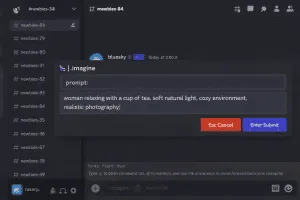
The Midjourney is an artificial intelligence tool that generates images from text commands, called prompts. It uses advanced AI models to interpret written descriptions and transform them into unique visual images.
Unlike traditional editing software, in Midjourney you don’t draw or edit manually. You describe what you want to see — and the AI creates the image for you.
Main uses of Midjourney:
-
Digital art creation
-
Concept design
-
Illustrations
-
Book covers
-
Social media images
-
Visual ideas for projects
Why did Midjourney become so popular?
Midjourney stood out because:
-
Produces extremely high quality images
-
Interprets complex prompts
-
Allows varied artistic styles
-
Constantly evolves with new versions
-
Is accessible even for non-designers
Additionally, it stimulates creativity and productivity, reducing the time between idea and final visual.
Midjourney: how to use step by step
Step 1 – Create a Discord account
Midjourney works within Discord.
-
Visit https://discord.com
-
Create a free account
-
Log in
Discord is a community and chat platform, similar to Slack.
Step 2 – Join the Midjourney server
-
Click “Join the Beta”
-
You will be redirected to Discord
-
Accept the invite to the official Midjourney server
Step 3 – Choose a plan
Currently, Midjourney is no longer free.
Plans vary according to:
-
Number of images
-
Generation time
-
Processing priority
For beginners, the basic plan is already sufficient.
Step 4 – Create your first image
-
Enter a channel called #newbies
-
Type the command:
-
In the prompt field, describe the desired image
-
Press Enter
-
Wait a few seconds
Midjourney will generate 4 image variations.
What is a prompt in Midjourney?
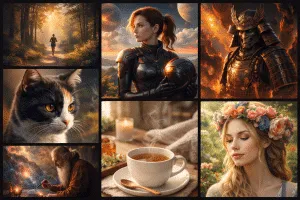
The prompt is the text you write to guide the AI.
Simple example:
More detailed example:
The clearer and more detailed the prompt, the better the result.
Structure of a good prompt
An efficient prompt usually includes:
-
Main object or scene
-
Artistic style
-
Environment
-
Lighting
-
Level of realism
-
Extra details
Complete example:
Main Midjourney commands
After images are generated, you’ll see buttons:
-
U1, U2, U3, U4 → Upscale (increase quality)
-
V1, V2, V3, V4 → Create variations
-
Reroll → Generate new options
Important Midjourney parameters
You can improve your results using parameters in the prompt:
-
--ar 16:9→ Define aspect ratio -
--v 6→ Define model version -
--stylize→ Artistic level -
--chaos→ Creative variety
Example:
Common mistakes when using Midjourney
- Vague prompts
- Using too many conflicting ideas
- Ignoring image aspect ratio
- Expecting perfection on the first try
- Not testing variations
Midjourney is a creative process: testing is part of it.
Tips to improve your images
- Use visual references
- Test different artistic styles
- Start simple and refine
- Save prompts that work
- Observe work from other users
With practice, your results improve quickly.
Conclusion
Learning Midjourney: how to use is opening the door to a new creative universe. With just a few commands and good descriptions, it’s possible to create professional, artistic and unique images, even without design experience.
The secret is in understanding how to write clear prompts, test variations and explore the tool’s features. Artificial intelligence doesn’t replace human creativity — it expands it. If you enjoy technology, visual creation or want to optimize creative processes, Midjourney is a tool that’s worth exploring.
Frequently Asked Questions
Is Midjourney free?
No. Currently it only works with paid plans.
Do I need to know design to use Midjourney?
No. You just need to know how to describe what you want.
Does Midjourney work outside of Discord?
No. It’s integrated into Discord.
Can I use images commercially?
It depends on the plan contracted. Check the official terms.