


SSD SATA vs NVMe: understand the difference and choose the right one for your case
If you’re building a PC, upgrading, or simply tired of boot times that seem eternal, the doubt between SSD SATA and SSD NVMe will appear sooner or later. The short answer: it depends on what you use, your budget, and what your motherboard supports. The long answer is what we’ll explore here.
SSD SATA uses the same interface as traditional hard drives, which facilitates compatibility with older machines. NVMe (Non-Volatile Memory Express), on the other hand, connects storage directly to the processor via the PCIe bus, delivering much higher speeds. In practice, SATA has a theoretical ceiling of about 600 MB/s sequential read, while modern NVMe drives reach 7,000 MB/s or more, depending on the PCIe generation.
But speed on paper doesn’t always translate into noticeable difference in daily use. And that’s exactly where the choice gets interesting.
General comparison: SATA vs NVMe in real numbers
| Criteria | SSD SATA | SSD NVMe PCIe 3.0 | SSD NVMe PCIe 4.0 | SSD NVMe PCIe 5.0 |
|---|---|---|---|---|
| Sequential read (max) | ~550 MB/s | ~3,500 MB/s | ~7,000 MB/s | ~14,000 MB/s |
| Sequential write (max) | ~520 MB/s | ~3,000 MB/s | ~6,500 MB/s | ~12,000 MB/s |
| Interface | SATA III | M.2 PCIe 3.0 x4 | M.2 PCIe 4.0 x4 | M.2 PCIe 5.0 x4 |
| Price range in Brazil (1 TB) | R$ 250 to R$ 400 | R$ 350 to R$ 550 | R$ 450 to R$ 750 | R$ 900 to R$ 1,500+ |
| Compatibility | Universal (SATA) | Wide (motherboard with M.2) | Newer platforms | Only new platforms |
| Power consumption | Low | Medium | Medium-high | High |
Prices checked in Brazilian stores in 2026 and subject to variation. Import tariffs and exchange rates directly affect national values.
How each technology works, without filler
SATA, short for Serial ATA, is a standard created in the 2000s for hard drives. When SSDs arrived, they simply used the same interface because it facilitated adoption. The original communication protocol, called AHCI, was designed for mechanical disks with high latency, so it was born with limitations when combined with fast flash memory.
NVMe was created specifically for solid-state storage. It uses the PCIe bus (the same as video cards) and communicates with the processor in a much more direct and efficient way. Think of it this way: SATA is like sending a letter by mail, NVMe is like speaking directly to the person next to you. Latency drops, bandwidth rises, and the number of parallel operations increases dramatically.
Within the NVMe universe, there’s still the variation of PCIe generation. PCIe 3.0 is already on practically any motherboard since 2016. PCIe 4.0 arrived with AMD Ryzen 3000 and Intel Alder Lake platforms, and today is the consolidated standard. PCIe 5.0 is present on newer platforms like Intel 13th gen Core and AMD Ryzen 7000, but SSDs that exploit this generation still have high prices and require extra attention to heat dissipation, as the controller heats up significantly.
When SATA still makes sense in 2026
It may seem like SATA is dead, but it still has relevant space. The first case is the old PC, with motherboard without M.2 slot or with only SATA available. Swapping a mechanical hard drive for a SATA SSD on that machine completely transforms the experience, with boot time dropping from over a minute to less than fifteen seconds on well-configured systems.
The second case is secondary storage. If you want a second large drive to store games, backups, or media files, a 2 TB SATA SSD runs around R$ 550 to R$ 750 in Brazil, depending on brand and store, and fulfills that function well. Sequential write speed close to 500 MB/s is more than enough to transfer large files without suffering.
Older notebooks also benefit greatly from SATA. If your laptop has a 2.5-inch slot and you want to give it a new lease on life before switching equipment, a SATA SSD is the best bang-for-buck upgrade that exists. Brands like Kingston, Crucial, WD, and Samsung have models widely available in Brazil, sold in stores like Kabum, Pichau, Terabyte, and Amazon.
When NVMe is the right path
If your motherboard has an M.2 slot and you’re building or reforming a PC from scratch, there’s no real financial reason to choose SATA as your primary drive. The price difference between a good quality NVMe PCIe 3.0 and SATA has dropped significantly: on some 1 TB models, the difference is less than R$ 100, which doesn’t justify giving up a speed difference that can reach six times.
For those who edit video, work with large projects in Premiere, DaVinci Resolve, or frequently transfer heavy files, NVMe PCIe 4.0 makes a noticeable difference. Copying a 50 GB project internally takes a fraction of the time compared to SATA. For gamers, the most noticeable difference is in loading games with Direct Storage, a feature that uses storage more intelligently and that Windows 11 already supports well with updated drivers.
NVMe PCIe 5.0 is, for now, territory for enthusiasts and professionals working with specific workloads. According to technical sheets from manufacturers like Crucial T705 and Seagate FireCuda 540, read speeds reach 14,000 MB/s, but the practical gain in everyday use is hard to perceive without tasks that saturate PCIe 4.0. Controller heating is also a point to check: several of these models recommend or require a heat sink installed, and you should check the technical sheet of the specific model before buying.
Compatibility in Brazil: what to check before buying
First and foremost, open your motherboard manual or check the manufacturer’s website. Look for how many M.2 slots it has, what PCIe generation is supported, and if there’s a length limitation (2242, 2260, or 2280, the latter being the most common). Buying an NVMe PCIe 4.0 on a board that only supports PCIe 3.0 won’t damage anything, but you’ll use PCIe 3.0 speed anyway.
About Anatel certification: SSDs don’t require Anatel certification, unlike products with wireless communication. This simplifies imports, but it’s important to buy from resellers that offer invoices and local warranty. Models sold by official distributors in Brazil typically have three to five years of warranty, depending on the line, and technical support in the country. Importing directly from American websites may be cheaper depending on exchange rates, but warranty typically needs to be claimed abroad.
If you build a complete PC with a GPU, as happens with those researching more powerful hardware alternatives, storage choice enters the same total cost planning. Those evaluating larger investments in components, like an RTX 5070 worth it in Brazil in 2026, it makes sense to already consider an NVMe PCIe 4.0 or 5.0 to not create a system bottleneck.
Physical formats: M.2, 2.5 inches, and U.2
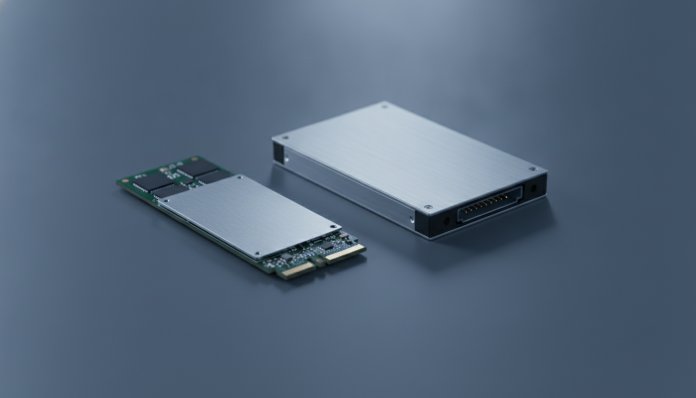
The M.2 format is the most common today and houses both SATA and NVMe SSDs. Yes, there are SATA SSDs in M.2 format. To identify which is which, you can check the connector keys: M.2 SATA uses B+M key, while NVMe uses M key. Check the drive’s technical sheet and motherboard manual before buying.
The 2.5-inch format is the classic for SATA SSDs, equivalent to the size of laptop hard drives. Still widely used in desktops with storage bays and in notebooks with dedicated slots. U.2 is a format found in high-performance SSDs for servers and professional workstations, rarely relevant to the average consumer.
Frequently asked questions about SSD SATA and NVMe
Is it worth switching from an SSD SATA to NVMe if the computer already works well?
It depends on what you do. For general use, browsing, Office, and casual gaming, the switch probably won’t change your perception of speed in daily life. If you edit video, deal with large files frequently, or want to reduce loading times in modern games with Direct Storage, the switch starts to make sense, especially if your board supports PCIe 4.0.
Can I install an NVMe on an old motherboard that only has SATA slots?
Not directly. But there are PCIe adapters that fit into the board’s expansion slot and allow you to install an NVMe. The solution works, but doesn’t take full advantage of the drive and may occupy a slot you’d use for something else. Check if your board supports boot via that slot before buying the adapter.
Does NVMe SSD heat up more than SATA?
Yes, especially PCIe 4.0 and 5.0 models under heavy load. Many motherboards already include heat sinks for M.2 slots, and it’s recommended to use them. Thermal throttling, which is when the drive reduces speed to protect itself from heat, can happen in enclosed environments without adequate ventilation. Check the operating temperature range in the technical sheet of the model you choose.
Do SSD brands have support and warranty in Brazil?
Kingston, Crucial, WD, Seagate, and Samsung have official presence in Brazil with support channels and local warranty for products purchased from authorized distributors. Parallel imported models may have warranty valid only in the country of origin, which complicates the RMA process. Always require an invoice and check if the product has national warranty before finalizing the purchase.
Which to choose, by profile and budget
If your budget is limited or the machine is old, SSD SATA is still one of the best bang-for-buck upgrades available. Removing a mechanical hard drive and putting any SSD SATA already transforms the user experience.
For those building a new PC or upgrading on a platform with support for M.2 PCIe 3.0 or 4.0, NVMe PCIe 4.0 is the sweet spot in 2026: accessible price, high speed enough for any domestic or moderate professional use, and wide availability of models in Brazil.
NVMe PCIe 5.0 makes sense only for those working with loads that really saturate PCIe 4.0, such as 8K RAW video editing, real-time rendering, or data-intensive workloads. For the gamer and home user, the extra cost isn’t justified yet.
Recommended for SATA: users with older PCs, notebooks with 2.5″ slot, secondary storage drives, or anyone who wants the cheapest possible upgrade.
Recommended for NVMe PCIe 4.0: those building a new PC, video editors, gamers with current platforms, and anyone with a compatible motherboard and moderate budget.
Recommended for NVMe PCIe 5.0: professionals with specific workloads, enthusiasts with recent platforms, and budget available to pay the premium still present in this category.