


NVMe or SATA: the difference you feel in practice
Choosing an SSD seems simple until the moment you open a product’s technical sheet and encounter acronyms like PCIe 4.0, M.2, SATA III and NVMe. Then the doubt hits: which of these standards really makes a difference in your daily life? The short answer is that it depends on what you do with your computer, but there’s a long answer that’s well worth knowing before putting anything in your cart.
The Brazilian storage market has evolved significantly by 2026. NVMe SSDs that once cost double a SATA are now in similar price ranges, which made the choice more complex and, at the same time, more interesting. This comparison will help you understand the technical differences, translate what they mean in practice, and point out which option makes the most sense for each usage profile, with options available in Brazil.
How each technology works
The SATA (Serial ATA) is an interface standard originally created to connect mechanical hard drives. When SSDs arrived on the market, they simply adopted the same connector and the same protocol. This was great for compatibility, but created a bottleneck: the SATA III bus, which is the most current, has a theoretical transfer limit of around 600 MB/s. In practice, SATA SSDs reach about 550 MB/s of sequential read speed, which is the maximum speed the standard allows.
The NVMe (Non-Volatile Memory Express) is a protocol created from scratch for flash memory, with no legacy from the hard drive era. It communicates with the processor directly through the PCIe (PCI Express) bus, the same path used by video cards. This eliminates the bottleneck. An NVMe SSD with PCIe 4.0 interface, for example, can achieve sequential read speeds above 7,000 MB/s, according to specifications from manufacturers like Samsung, Kingston and WD. That’s more than ten times what SATA delivers.
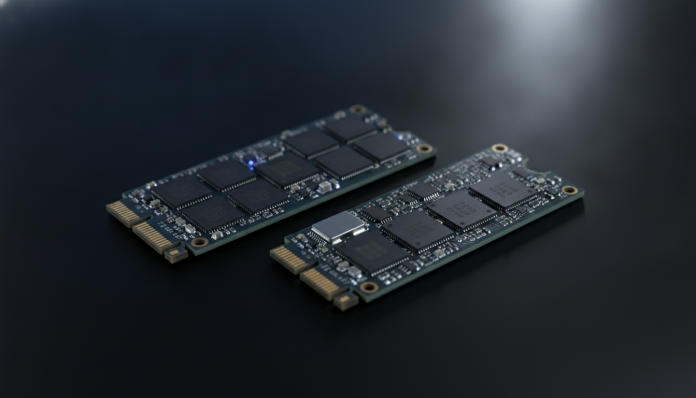
The most common physical format for NVMe is the M.2, a small card that plugs directly into the motherboard. The important detail: the M.2 slot can be compatible with SATA or NVMe, depending on the motherboard. There are M.2 SSDs that use the SATA protocol and M.2 SSDs that use NVMe. Checking which protocol your slot supports before buying is essential.
Comparison table: SATA vs NVMe
| Feature | SATA SSD | NVMe SSD (PCIe 4.0) |
|---|---|---|
| Interface | SATA III | PCIe 4.0 x4 |
| Sequential read (max) | ~550 MB/s | ~7,000 MB/s |
| Sequential write (max) | ~520 MB/s | ~6,500 MB/s |
| Most common format | 2.5″ or M.2 SATA | M.2 2280 |
| Power consumption | Lower | Higher (generates more heat) |
| Average price in Brazil (1 TB) | R$ 250 to R$ 380 | R$ 350 to R$ 600 |
| Compatibility | Universal (any PC with SATA port) | Requires M.2 NVMe slot on motherboard |
| Heating | Low | Moderate to high (heatsink recommended) |
Approximate prices in 2026; values vary by retailer and exchange rate.
When NVMe speed actually matters
Before jumping to NVMe on impulse, it’s worth understanding which scenarios show that extra speed for real.
Large file transfers are where NVMe shines most visibly. Moving a 4K video project, copying a backup of dozens of gigabytes or extracting heavy files are tasks where the difference between 550 MB/s and 7,000 MB/s is felt on the clock. If you edit video professionally, work with heavy renders or deal with virtual machines, NVMe delivers concrete gains.
Boot time and application opening is an area where the difference exists, but is smaller than the numbers suggest. Both a SATA SSD and an NVMe will have Windows 11 ready in seconds. The processor, RAM and the operating system itself create other bottlenecks that lessen NVMe’s advantage in everyday tasks. For those who use their PC for browsing, office work and media consumption, SATA already delivers a fluid enough experience.
Games fall in an intermediate position. Titles with large open maps and real-time asset loading, such as those released from 2024 onwards with DirectStorage technology support, can benefit from a fast NVMe. But most games still don’t exploit this feature significantly. Check the requirements of the specific game you intend to play before making the decision based solely on games.
If you’re building a PC for video editing and want to get the most out of storage, it’s also worth reading about how to choose other system components, such as the video card for editing, which directly impacts your workflow with large files.
When SATA still makes sense
SATA remains a smart choice in several scenarios, and underestimating it is a common mistake.
Compatibility with older hardware is the strongest argument. Notebooks and desktops manufactured before 2018 often don’t have an M.2 NVMe slot available, or have M.2 slots that only support SATA. In these cases, a 2.5″ SATA SSD is the only viable option without changing the motherboard. For those upgrading an old notebook away from a mechanical drive, switching to SATA completely transforms the experience.
Cost per gigabyte still favors SATA in some configurations. If you need lots of storage space and usage is mainly aimed at storing files, photos and videos that you access sporadically, paying more for an NVMe doesn’t bring practical returns. Two 1 TB SATA SSDs can be cheaper than a 2 TB good quality NVMe.
Power consumption and temperature are also factors. PCIe 4.0 NVMe SSDs, especially high-performance ones, generate heat and consume more power. On notebooks with limited battery, this matters. PCIe 3.0 NVMe models are more balanced in this regard, but PCIe 4.0 is now the dominant standard sold on shelves.
Options available in Brazil and what to watch for when buying
The Brazilian market has established brands that sell SSDs with national warranty. Among the most present in physical and electronic stores in 2026 are Kingston, Samsung, WD (Western Digital), Crucial, Lexar and Seagate. Some Chinese brands like Netac and Adata also have national distribution, usually with more competitive prices.
A critical point for the Brazilian consumer: verify if the product has Anatel approval or if it’s imported without certification. SSDs themselves don’t need Anatel approval the same way devices with radio do, but products without an invoice or sold through direct import lose warranty coverage in Brazil. Prefer to buy from authorized retailers, especially if it’s a high-value NVMe, as the warranty usually ranges from 3 to 5 years on mainstream models.
When comparing specifications, pay attention to:
- IOPS (input/output operations per second): measures performance on small files, more relevant to daily use than sequential speed
- TBW (terabytes written): indicates memory cell durability; the higher, the longer estimated lifespan
- NAND memory type: QLC (cheaper, lower durability) versus TLC (balance between cost and lifespan); confirm in the manufacturer’s technical sheet
- Presence of DRAM cache: SSDs without dedicated cache experience performance drops in long transfers; check the official specification
Frequently asked questions about NVMe and SATA SSDs
Can I put an NVMe SSD on any motherboard?
No. Your motherboard needs to have an M.2 slot compatible with NVMe, which means it must support the PCIe protocol. Older motherboards with M.2 slots may only support SATA. Consult your motherboard manual or the manufacturer’s website to confirm before buying.
Does a PCIe 4.0 NVMe SSD work on a motherboard with a PCIe 3.0 slot?
Yes, it works, but will operate at the speed of the available bus, which is PCIe 3.0. You won’t reach the 7,000 MB/s of the 4.0 standard, but will still have speeds significantly higher than SATA. Backward compatibility exists, and this doesn’t cause damage to hardware.
Is it worth importing an SSD from the US to save money?
It depends on the value and your willingness to bear the risk. SSDs imported without a national invoice lose local warranty, and in case of defect you pay for international shipping. For products up to US$50 within the exemption limit, it may be worth it. Above that, the risk usually doesn’t justify the savings, especially considering that national prices have improved significantly in 2025 and 2026.
Does NVMe heat up so much that it needs a heatsink?
High-performance PCIe 4.0 NVMe SSDs can reach high temperatures under heavy use, which activates thermal throttling (automatic speed reduction to protect the component). Many motherboards already include a heatsink on the M.2 slot. If yours doesn’t, separate heatsinks cost between R$30 and R$80 and solve the problem.
Which one to choose, after all

If your PC supports NVMe and budget allows, NVMe is the choice most prepared for the coming years. The price difference compared to SATA has shrunk, and you gain real speed in heavy tasks plus a platform more aligned with what operating systems and applications are increasingly demanding.
For those upgrading an old notebook or desktop without NVMe slot, or simply need a lot of storage at lower cost, SATA still delivers exactly what it promises: a huge improvement over any mechanical hard drive, with guaranteed compatibility and affordable prices.
Profile that should choose NVMe: video and photo editors, developers, gamers on new platforms, users with virtual machines or those who do heavy transfers frequently.
Profile that does well with SATA: basic and intermediate task users, those upgrading old hardware, those who need lots of space on a tight budget, and those who use their PC mainly for browsing, streaming and office work.
In both cases, any SSD will represent a huge jump in quality if you’re still using a mechanical hard drive. That, yes, is the upgrade that transforms the experience from zero.