


INTRODUCTION
The advancement of assistive technology is redefining the concept of accessibility. For the low vision community, innovation in hardware and software is not merely “help,” but the complete restoration of functional autonomy and digital independence. Far from the simple devices of the past, today’s gadgets use Artificial Intelligence (AI), high-resolution cameras, and real-time processing to execute complex tasks.
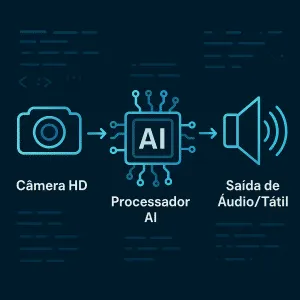
The key to these devices is not merely magnification, but rather format conversion. They transform visual information into accessible formats, such as audio and touch. This data transformation capability is what is truly changing the game.
In this article, we will detail the 5 most impactful accessibility gadgets for low vision on the market. We will cover their technical specifications, unique features, and how they integrate into the modern digital ecosystem. If you are looking for the most advanced tools to optimize your experience or that of someone you know, keep reading.
The Revolution of Assistive Technology 2.0

Accessibility gadgets for low vision have moved from the periphery to mainstream, driven by component miniaturization and AI computational power. The priority now is intuitive usability and portability, allowing technology to accompany the user in any environment, indoors or outdoors.
The 5 Accessibility Gadgets at the Top
We analyzed the most innovative devices, focusing on their technical characteristics and practical application.
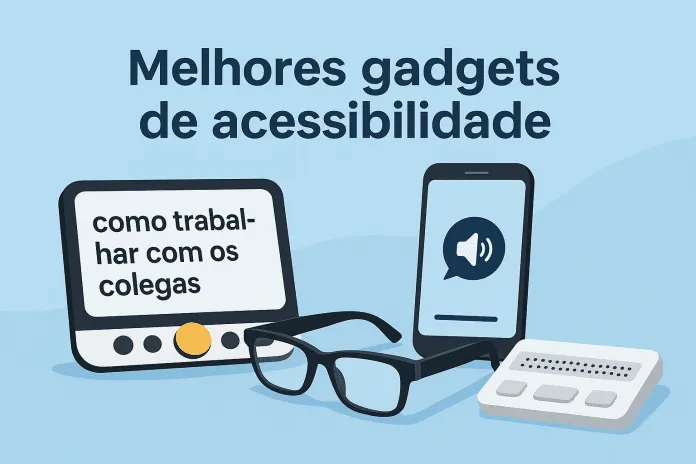
1. Portable OCR Readers and Scanners (Optical Character Recognition)
-
What They Are: Compact devices (often in pen or foldable camera format) dedicated to scanning and instantaneous reading of printed text.
-
Functionality and Specifications:
-
OCR Engine: Uses advanced software to identify and process text in multiple languages with high accuracy (over 98% on clean text).
-
Audio Output: Integrated speaker and support for low-latency Bluetooth headphones for discreet reading.
-
Portability: Long-lasting batteries (typically 4-6 hours of continuous use) and lightweight design.
-
-
How to Apply in Practice: Essential for reading product labels, letters, manuals, and bills without depending on lighting or original font size.
2. Electronic Magnifiers with Advanced Color and Contrast Features
-
What They Are: Devices with high-definition LCD screens (HD or Full HD) and a built-in camera, offering digital magnification superior to traditional optical magnifiers.
-
Functionality and Specifications:
-
Dynamic Magnification: Zoom variation, typically from to .
-
Viewing Modes: Support for over 10 color and high contrast combinations (ex: negative colors, yellow text on black background) to maximize reading for different visual conditions.
-
HDMI/USB-C Output: Allows connection with larger external monitors for desktop viewing (Closed-Circuit TV mode).
-
-
How to Apply in Practice: Excellent for prolonged reading, detailed manual work, and photo viewing with adapted color filters.
3. Smart Glasses with Computer Vision (AI)
-
What They Are: Wearable devices that use a discreet camera to capture the environment and an internal processor with AI to describe what it “sees” to the user via audio.
-
Functionality and Specifications:
-
Image and Scene Recognition: Ability to identify objects, coins, colors, street signs, and environments (“you are in a park”).
-
Real-Time Text Reading: Reading text from screens and surfaces, even when in motion.
-
Connectivity: Synchronization with smartphone apps via Bluetooth for software updates and customization.
-
-
How to Apply in Practice: Essential for mobility and safety in unfamiliar environments, as they provide contextual information without the need to handle other devices.
4. Accessible GPS Navigation Systems and Tactile Feedback
-
What They Are: Software and hardware solutions (often specialized wristbands or applications) that provide route guidance based on audio and tactile vibrations, designed specifically for safe navigation by people with visual impairments.
-
Functionality and Specifications:
-
Detailed Mapping: Uses map data with a high level of detail (such as sidewalks and steps) that goes beyond standard GPS.
-
Vibration Feedback: Different vibration patterns indicate turns, intersections, or destinations.
-
Companion Mode: Some platforms allow a remote companion to monitor location and route progress.
-
-
How to Apply in Practice: Optimizes public transport route planning and pedestrian navigation in complex urban areas, increasing mobility independence.
5. Smartphone Optimization: The Accessibility Hub
-
What They Are: Mobile operating systems (iOS and Android) are software platforms that serve as the central hub for assistive technology.
-
Functionality and Specifications:
-
Native Screen Readers: VoiceOver (iOS) and TalkBack (Android) offer full device control via gestures and audio.
-
Zoom and Display Features: Color filters, color inversion, and screen zoom that work at the system level.
-
Open APIs: Allows developers to create third-party applications that integrate natively with accessibility features, such as money recognition or color identification apps.
-
-
Progression/Next Steps: Mastering these native features is the foundation. The next step is integrating smartwatches or external Bluetooth keyboards for even more efficient data input and output methods.
Technical Specifications and Integration
To choose the ideal accessibility gadget for low vision, it is crucial to analyze latency and interoperability.
Latency and Data Processing
-
Explaining the Benefit: Low latency (response time) is vital, especially in OCR reading devices and AI Glasses. A millisecond delay can compromise safety or reading comfort.
-
How to Apply in Practice: Look for devices that use dedicated processors (ASICs) or lightweight AI models optimized for on-device processing, minimizing dependence on cloud connection and reducing delay in environmental description.
Ecosystem and Interoperability (API)
-
Explaining the Benefit: A good gadget should communicate with your smartphone and other devices. For example, the ability of an OCR reader to send read text to a tactile braille display.
-
How to Apply in Practice: Verify that gadgets use open standards (such as Bluetooth LE or operating system accessibility APIs) and that the manufacturer offers regular firmware updates to ensure future compatibility.
CONCLUSION
Assistive technology has evolved from simple optical aids to sophisticated computational systems. The 5 accessibility gadgets for low vision we detailed from the processing power of OCR Readers to the autonomy of AI Glasses represent the forefront of digital inclusion.
Investing in the right gadget is investing in independence, efficiency, and access to information on equal footing. When considering your next purchase, prioritize low latency, software accuracy, and interoperability with your digital ecosystem.
Share in the comments which of these gadgets had the most impressive technical specifications for you!
Frequently Asked Questions:
- What is OCR and why is it important in accessibility gadgets for low vision?
A: OCR (Optical Character Recognition) is the technology that converts images of text into machine-readable digital data. It is crucial because it allows accessibility gadgets to read aloud or send any printed text (such as documents or notes) to braille displays.
Which operating system is better for assistive technology, iOS or Android?
A: Both systems (iOS with VoiceOver and Android with TalkBack) offer robust accessibility suites. The choice depends on user familiarity and compatibility with third-party gadgets, as some manufacturers optimize for one ecosystem first.
Do AI smart glasses work well in different lighting conditions?
A: The most advanced models use HDR (High Dynamic Range) cameras and AI algorithms optimized for computer vision, which improves performance in low or excessive light conditions. However, performance may vary in total darkness.
How does low vision affect the choice between optical and electronic magnifiers?
A: Optical magnifiers offer fixed magnification and depend on lighting. Electronic magnifiers are preferable in cases of severe low vision, as they offer dynamic control over magnification, contrast, colors, and brightness, customizing the viewing experience for the user’s specific visual condition.